Achievements Closed beta
The achievements feature, also known as the Gamification Engine, allows you to check if a customer has reached a defined target.
You can use achievements for the following purposes:
-
To check if your customers have performed a defined action a target number of times within the achievement period. For example, a customer completes an achievement when they place three orders in seven days.
-
To check if customers have spent a target amount of time or money within the achievement period. For example, a customer completes an achievement when they have spent $500 in your online store over a period of two months.
-
To track the number of times customers completed an achievement. For example, a customer receives a reward on every seventh purchase.
Use campaigns to then reward your customers for completing an achievement. This can help boost customer engagement, improve loyalty to your brand, and increase sales.
Prerequisites
- You have created an Application in your account.
- You have created an achievement and connected at least one Application where you want to use it.
- You have created a campaign in one of the connected Applications.
Use achievements
You can use achievements by following these steps in the Rule Builder of your campaign:
- Create a rule and add a condition to define the customer action or event that is counted by the achievement.
- Add an effect to update a customer's progress in the achievement.
- Create another rule and adding a condition to check if the achievement has been completed by the customer.
- Add an effect to reward the customer for completing the achievement.
Achievement types
There are three types of achievements available when you create an achievement:
- One-time: The achievement can be completed only once.
- Recurring on expiration: The achievement resets after it expires and becomes available again.
- Recurring on completion: The achievement resets after it is completed and becomes available again.
For one-time and recurring on expiration achievements, you can also choose an activation policy: user action or fixed schedule.
One-time achievements
A one-time achievement means the achievement can be completed only once. After the achievement ends, it is no longer available for customers to participate in.
One-time user-action achievements
Let's imagine a one-time user-action achievement that has an achievement period of 4 days. The achievement starts when the customer makes their first progress and ends relative to when they started the achievement.
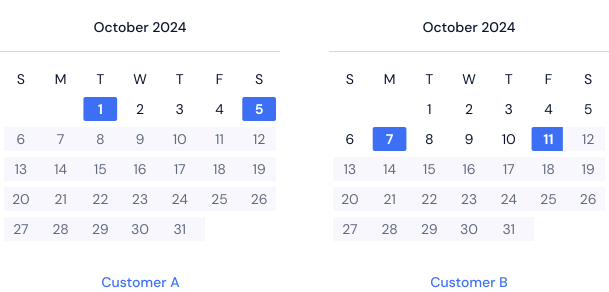
In the example above, Customer A starts the achievement on October 1. Since the achievement period is set to four days, the achievement for that customer ends four days later, on October 5. Another customer, Customer B, makes their first progress on October 7. For this customer, the achievement ends on October 11.
After the achievement ends, it is no longer available for either customer to participate in.
See the tutorial: Incentivize users to provide profile information
One-time fixed-schedule achievements
Let's imagine a one-time fixed-schedule achievement with October 2 for its start date and October 12 for its end date. Individually, the achievement for each customer starts when the customer makes their first progress, but ends on October 12 for all customers in the campaign.
In this example, Customer A makes their first progress in the achievement on October 4 and completes the achievement on October 10, two days before the achievement's end date. In contrast, Customer B makes their first achievement progress on October 6 but doesn't complete the achievement before the October 12 end date, and their achievement status is expired.
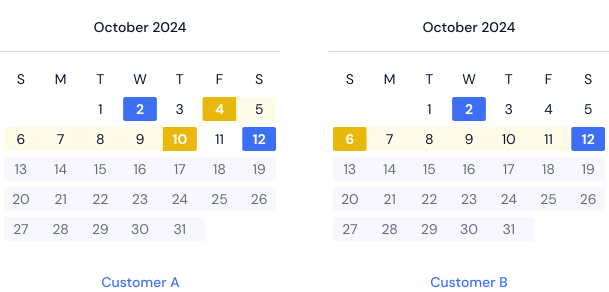
After the achievement's October 12 end date, the achievement is no longer available for either customer to participate in.
See the tutorial: Drive Black Friday sales with a limited-time spend challenge
Recurring on expiration achievements
A recurring on expiration achievement resets after it expires and becomes available again for the customer.
Recurring user-action achievements
Let's imagine a recurring user-action achievement that resets every four days. The achievement starts when the customer makes their first progress, and ends and resets relative to when they started the achievement.
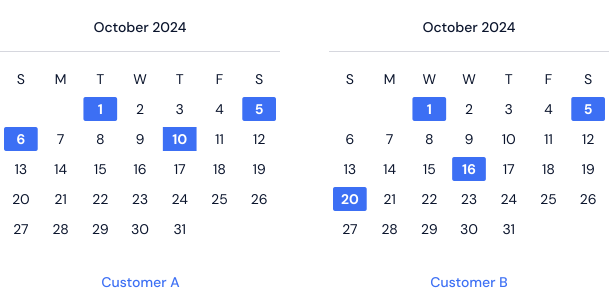
In the example above, Customer A starts the achievement on October 1. Since the achievement period is set to four days, the achievement for that customer ends and resets four days later, on October 5. The customer makes their first progress the next day in the reset achievement, which ends and resets on October 10.
Customer B also makes their first progress on October 1, and the achievement ends and resets for them four days later, on October 5. However, the customer doesn't make their first progress in the reset achievement until October 16. Following the reset period of four days, this achievement ends and resets on October 20.
See the tutorial: Boost credit card adoption with cashback rewards
Recurring fixed-schedule achievements
Let's imagine a recurring fixed-schedule achievement with its start date set to October 1. Individually, the achievement for each customer starts when the customer makes their first progress. However, the achievement ends and resets every two weeks relative to October 1 for all customers in the campaign.
In this example, Customer A makes their first progress in the achievement on October 3 and completes the achievement on October 12, three days before the achievement's reset date. On October 16, the customer makes their first progress in the reset achievement and once again completes the achievement within the two-week reset period.
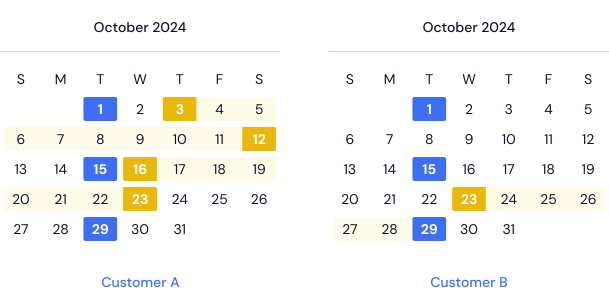
Customer B does not participate in the achievement that starts on October 1. The customer, however, makes their first progress on October 23 in the reset achievement but fails to complete it before the achievement ends and resets again on October 29.
See the tutorial: Increase customer engagement with an Advent calendar campaign
Recurring on completion achievements
A recurring on completion achievement starts a new iteration each time the customer progress status reaches completed.
The target represents the progress required to complete one iteration of the achievement. When a customer's progress exceeds the achievement target, the progress automatically carries over to new iterations of the same achievement.
In a recurring on completion achievement, a customer's progress does not have an expiration date.
Example
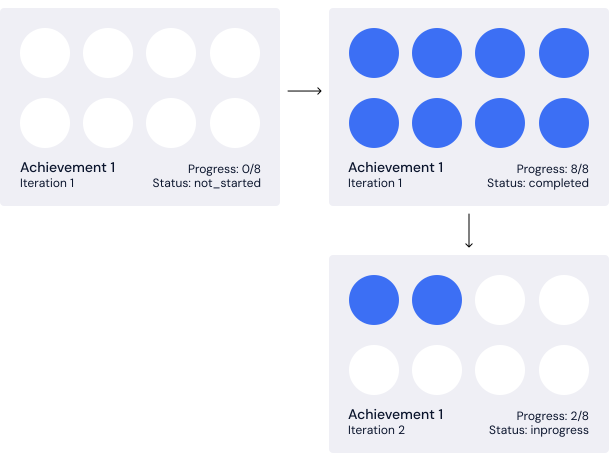
Let's use digital stamp cards to illustrate how recurring on completion achievements work.
Each stamp card is one iteration of the achievement, with a target of eight stamps. After a customer completes a stamp card by earning eight stamps, any additional stamps automatically carry over to a new stamp card.
Imagine a customer who has not started the achievement earns 10 stamps in a single session. When the session closes, the first eight stamps complete a stamp card, and the two remaining stamps automatically carry over to a new stamp card.
See the tutorial: Reward customers for repeat coffee purchases
List achievements
To list your achievements, on the leftmost menu of the Campaign Manager, click Achievements.
The page displays all the available achievements in the account and contains the following information:
| Column | Description |
|---|---|
| Name | Name of the achievement as it appears in the Campaign Manager. |
| API name | Name of the achievement as it appears in API requests. |
| ID | Unique ID identifying the achievement. |
| Target | Target value that the customer must reach to complete the achievement. |
| Campaigns | Number of campaigns that use the achievement. Click the number to see which campaigns it is used in. |
| Created on | Date on which the achievement was created. |
| Created by | User who created the achievement. |
| Actions | Export customer data: Export the data of all customers who have made progress in the achievement. Delete: Delete the achievement. |