Integrate with Shopify
Talon.One supports integrating with Shopify using a dedicated app.
Shopify integration features
The Talon.One Shopify app enables real-time data synchronization between Shopify and Talon.One.
By creating a bidirectional data flow, the integration enables store owners to do the following:
- Sync product data and customer profiles with Talon.One, for example, to create personalized coupons or award loyalty points.
- Send customer session data, including the customer's shopping cart.
- Receive customer data from Talon.One, for example, the number of loyalty points awarded.
- Receive strikethrough pricing updates from Talon.One.
- Receive discount effects in Shopify and apply them to the shopping cart.
Data flow
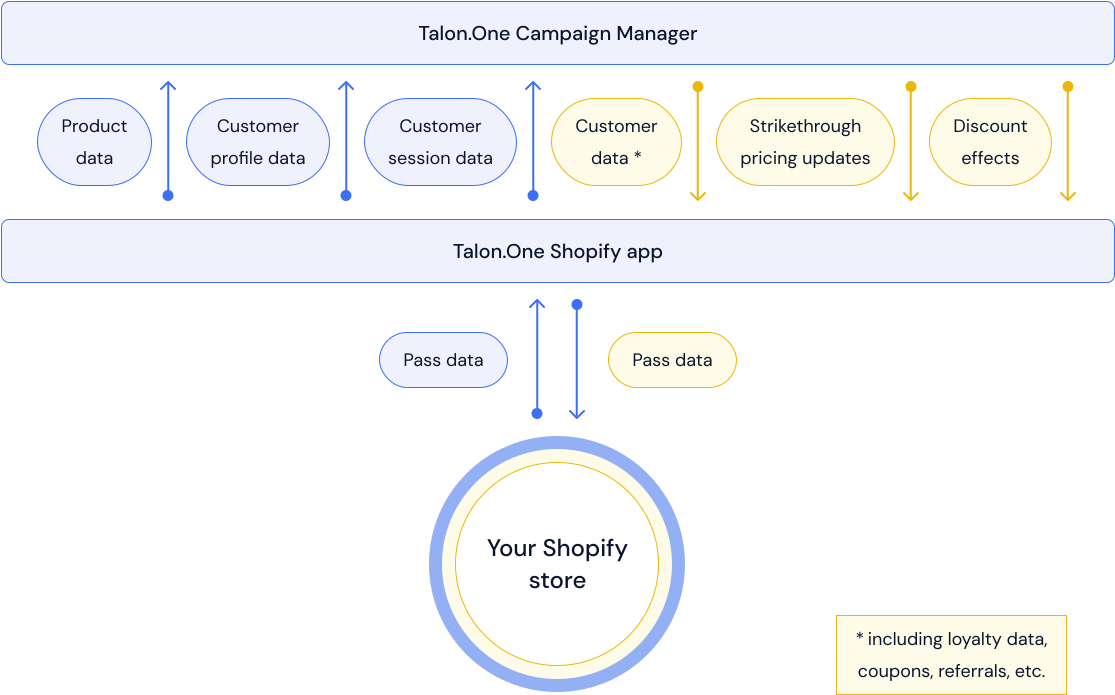
From Shopify to Talon.One
Product data
When you connect the app to a cart item catalog in Talon.One, it performs an initial product sync.
The app calls the Sync cart item catalog endpoint to add all products in Shopify to a cart item catalog in Talon.One.
-
To re-trigger the product sync:
- On the Product data sync page, note the value in the Catalog ID field.
- Replace the value with
0, and click Save. - Restore the previous value in the Catalog ID field, and click Save.
-
When synchronizing SKUs between Shopify and Talon.One, the following applies:
- The
skufield in Talon.One is populated with the variant ID from Shopify. - The SKUs in Shopify are stored in a separate
sku_shopifyfield in Talon.One.
This is because SKUs can be empty or duplicate in Shopify, but must be unique in Talon.One.
- The
The app does not delete any data, but replaces existing products with the same variant ID.
Then, whenever a product is created, updated, or deleted in Shopify, the app calls the same endpoint to update the cart item catalog.
If any of the product data operations trigger strikethrough pricing updates, Talon.One returns the effects of these updates to Shopify.
Customer profile data
When a customer profile is created or updated in Shopify, the app calls the Update customer profile endpoint to send customer data to Talon.One.
Also, when a customer completes their order, the profile of that customer is created or updated.
The app only sends the customer data you've selected in the customer data sync configuration.
Customer session data
When a customer adds items to their shopping cart, the app calls the
Update customer session
endpoint to create or update a
session in Talon.One. The state of the
session is open, and the session ID is equal to the cart ID in Shopify. When a customer
updates their cart, the app calls the same endpoint to update the session with the new
cart data.
The response from the endpoint may contain discount effects that will be applied at checkout.
When a customer completes their order, the session is updated, and its state changes to
closed.
When a return is initiated, the session state changes to cancelled (for fully returned
orders) or partially returned (for partially returned orders).
From Talon.One to Shopify
Customer data
- Theme-based stores
- Headless stores
For theme-based stores, an app embed is used to fetch customer data.
Whenever a signed-in customer is accessing a page of your store, for example, a product page, the app embed calls the Retrieve customer data endpoint to fetch data of that customer from Talon.One.
To reduce data load, the app embed fetches data only once every 10 seconds.
The app embed always fetches all available customer data, including customer profile, referral, coupon, loyalty, giveaway, and achievement information. For example, the data may contain a coupon generated for the customer, and their total number of awarded loyalty points.
The data is stored in a customer metafield in Shopify. To reference it in your template, use the following Liquid code:
{{ customer.metafields.talon_one.data }}
You can also access the metafield data via JavaScript:
const customerData = window.TalonOne.customerProfile;
For more information, see our tutorial.
For headless stores, there's a dedicated Retrieve customer data endpoint to fetch customer data.
It is recommended to call this endpoint whenever a customer signs in, or returns to the site after a period of inactivity.
To reduce data load, this endpoint will not fetch data more than once every 10 seconds.
The endpoint always fetches all available customer data, including customer profile, referral, coupon, loyalty, giveaway, and achievement information. For example, the data may contain a coupon generated for the customer, and their total number of awarded loyalty points.
The data is returned as a response to your request, and is also stored in a customer metafield in Shopify.
For more information, see our tutorial.
Strikethrough pricing updates
Whenever the app receives a
strikethrough pricing notification
from Talon.One, it stores the pricing effects of the notification (changedItems.effects,
see
schema)
in a product variant
metafield in Shopify. For
example, the pricing effect can be a $10 discount on all shoes in your store.
To reference the metafield in your template, use the following Liquid code:
{{ product.selected_or_first_available_variant.metafields.talon_one.effects }}
For more information, see our tutorial.
Discount effects
When customer session data is created or updated, Talon.One may return discount effects. These effects can include discounts on the order total, individual items, or shipping costs.
The app receives these effects and applies them at checkout in Shopify. For more information, see our applying discounts tutorial.
To install and configure the app, see Set up the Shopify app.