Quickstart
Set up a live campaign and trigger a discount through the Integration API.
- How to create a Talon.One Application and generate an API key.
- How to build a campaign with a coupon-based discount rule.
- How to send a customer session update via the Integration API.
- How to read the effects from the API response.
Prerequisites
Ensure you have access to the Campaign Manager and Postman.
Create an Application
-
In the Campaign Manager, open Apps and click Create Application.
-
Enter a name for your Application.
-
Select a currency and timezone.
-
In Code case sensitivity, select Case insensitive - Uppercase.
-
In Application environment, select Sandbox and click Create Application.
A new Application is created and opens to the Campaigns page.
Get your API key and set up Postman
-
In the Application, open Settings > Integration API Keys.
-
Click Create API Key and enter a name and expiration date.
-
Click Create API Key, then copy the key.
-
Fork the Integration API Postman collection.
-
Open the Variables tab and set the following values:
Variable Value APIKey_IAPIYour API key baseUrlThe base URL of your Talon.One deployment.
Example:https://mycompany.europe-west1.talon.one/. -
Click Save.
Create and activate a campaign
Create a campaign that uses a promotion rule: when a customer applies the code SUMMERSALE26, they receive a 10% discount.
Create the campaign
- In the Campaign Manager, open Campaigns and click Create Campaign.
- Select From scratch, then Standard campaign.
- In Campaign name, enter
Summer Sale. - Enable the Coupons feature and click Create Campaign.
Add a rule
- Open Rule Builder and click Create Rule.
- Enter
10% offas the rule title. - Under Conditions, click Add Condition and select Coupon code is valid.
- Under Effects, click Add Effect, select Discount session total, and click Done.
- Click Save.
Create a coupon
- Open Resources > Coupons and click Create Coupons.
- Select Universal Code and enter
SUMMERSALE26as the coupon code. - Click Create Coupons.
Activate the campaign
- Click Overview on the left-side menu and click Activate campaign.
- Click Activate to confirm.
The campaign is now live and ready to evaluate Integration API requests.
Send a request
Send a request to the Update customer session endpoint to create a customer session and add a cart item and a coupon to it.
You can send this request in several ways, for example:
- Postman: Use the collection you set up previously.
- API reference: Use the Test request button in the Update customer session endpoint.
- curl: Use the following command, where:
YOUR_BASE_URLis the base URL of your Talon.One instance, for example,mycompany.talon.one.YOUR_API_KEYis the Integration API key you created.
curl --request PUT 'https://YOUR_BASE_URL/v2/customer_sessions/session_12345' \
--header 'Authorization: ApiKey-v1 YOUR_API_KEY' \
--header 'Content-Type: application/json' \
--data-raw '{
 "customerSession": {
   "profileId": "John Doe",
   "cartItems": [
     {
       "name": "green sweater",
       "sku": "SKU1234",
       "quantity": 1,
       "price": 140,
       "category": "sweaters",
       "weight": 0.5
     }
   ],
   "couponCodes": ["SUMMERSALE26"]
 },
 "responseContent": [
 ]
}'
The session session_12345 is linked to the customer profile ID set to John Doe and contains one cart item and one coupon code.
Talon.One's response looks like:
{
    "createdCoupons": [],
    "createdReferrals": [],
    "effects": [
        {
            "campaignId": 2243,
            "rulesetId": 8400,
            "ruleIndex": 0,
            "ruleName": "10% off",
            "effectType": "acceptCoupon",
            "triggeredByCoupon": 42542160,
            "evaluationGroupID": 1,
            "evaluationGroupMode": "stackable",
            "props": {
                "value": "SUMMERSALE26"
            }
        },
        {
            "campaignId": 2243,
            "rulesetId": 8400,
            "ruleIndex": 0,
            "ruleName": "10% off",
            "effectType": "setDiscount",
            "triggeredByCoupon": 42542160,
            "evaluationGroupID": 1,
            "evaluationGroupMode": "stackable",
            "props": {
                "name": "10% off",
                "value": 14.0,
                "scope": "cartItems"
            }
        }
    ]
}
The important part of the response is the effects array. In this case, the rule triggered two effects:
acceptCoupon: the coupon code is valid.setDiscount: the discount amount is invalue(14.0).
Next steps
Now you can apply the effects from the response.
For example, in an ecommerce integration, you can update your checkout and inform the shopper of their discount:
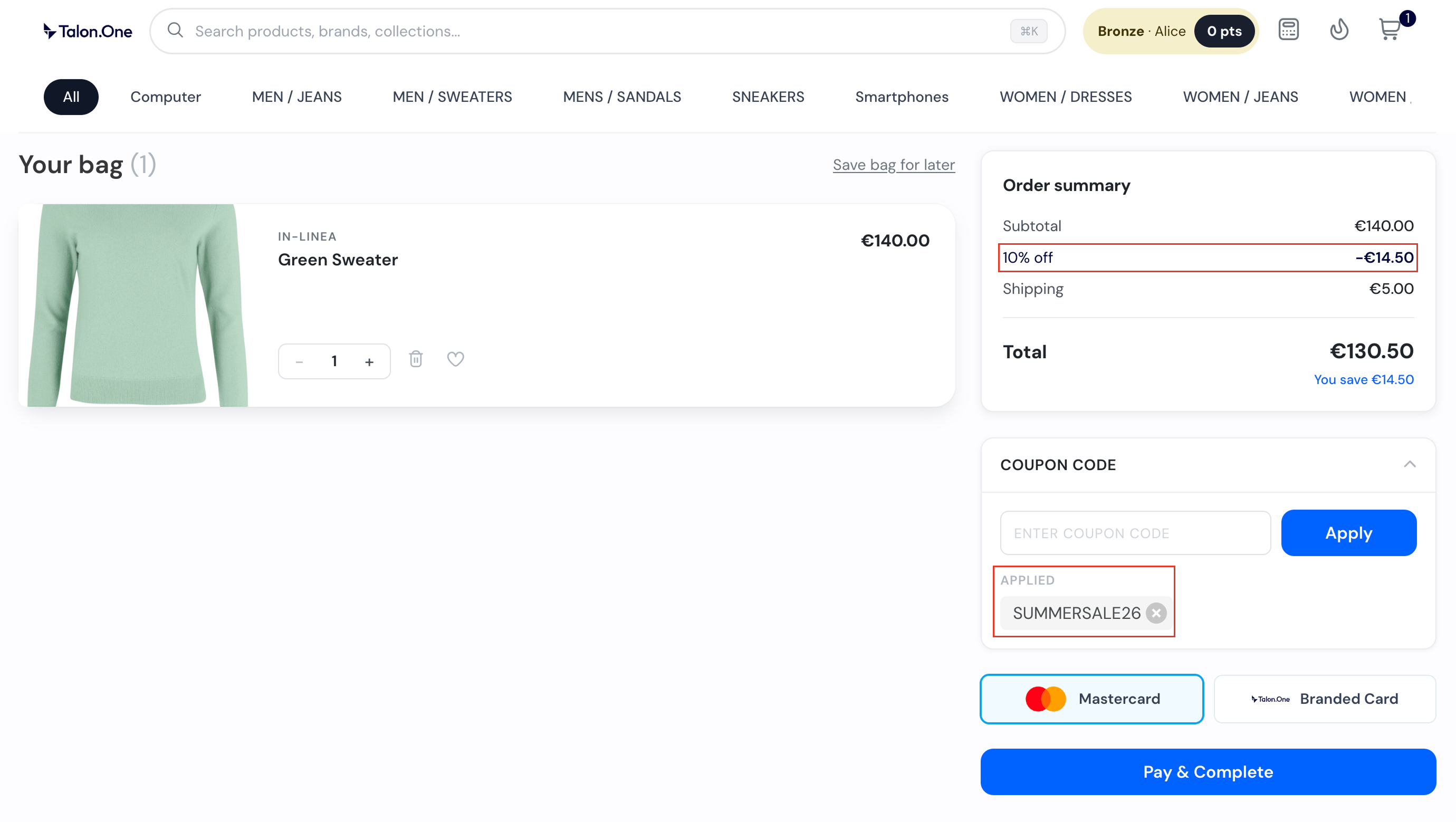
- For
acceptCoupon, display a confirmation. For example, a Coupon applied label next to the coupon code field. - For
setDiscount, applyprops.valueto the cart total. In this example,14.0updates the cart from $145 to $130.50.