Talon.One MCP server Closed beta
The Talon.One MCP server connects your Talon.One environment to AI agents.
It gives agents secure, read-only access to your campaigns, customers, coupons, and loyalty programs. Agents provide answers about your promotions without you having to navigate the Campaign Manager or write code.
The Talon.One MCP server enables campaign managers, support agents, and anyone using AI agents to do the following, for example:
- Answer questions in plain language about campaigns and loyalty programs.
- Identify performance trends and pain points without building reports or navigating the Campaign Manager.
- Investigate customer sessions and eligibility issues in seconds.
To start using the Talon.One MCP server, connect it to your AI agent.
Architecture
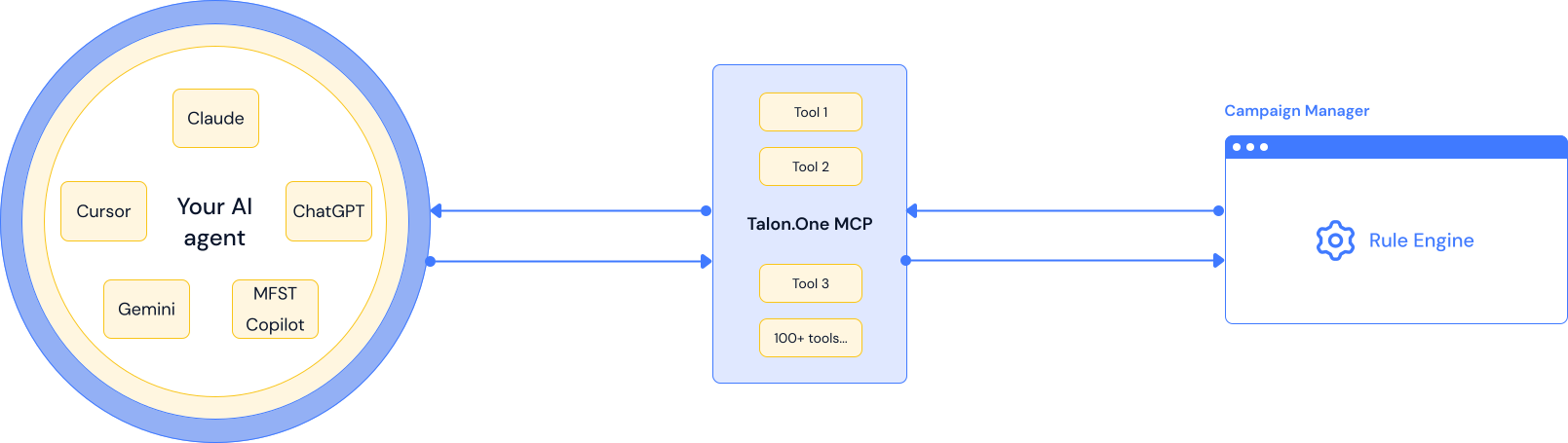
The Talon.One MCP server is a layer between your AI agent and your Talon.One environment. It provides tools that help your AI agent understand Talon.One. The server doesn't contain or run an AI model, and Talon.One doesn't use your data to train AI models.
The Talon.One MCP server authenticates you through your Talon.One account, so agents access only the data allowed by your account permissions. Third-party AI services may process your data. Review your company AI policies before you connect tools that access customer data.
Rate limit
The Talon.One MCP server allows up to three requests per second for each Talon.One account. Requests from all AI agents that act on behalf of the same account count toward this limit. How the limit applies depends on your authentication method:
- With OAuth 2.0, the limit applies to the account you sign in with.
- With API key authentication, the limit applies to the account that the API key belongs to, not to the key itself. Requests count toward the same limit, regardless of whether several people share one API key or use different keys created by the same admin user.
When an AI agent reaches the limit, the MCP server instructs it to wait 30 seconds and retry. AI agents usually handle this automatically, so you don't notice when the limit has been reached, even with large prompts.
If you run several AI agents at the same time on complex tasks, we recommend mentioning the rate limit in your prompts. For example:
The Talon.One MCP server allows three requests per second. If you reach the limit, wait 30 seconds and retry.
Because these AI agents share the limit, mentioning it in a prompt helps agents pace their requests and avoid repeated 30-second waits.
Supported tasks
The Talon.One MCP server gives AI agents tools to read and understand your Talon.One data.
When connected, agents can, for example:
- Explain the logic behind specific campaign rules and loyalty transactions.
- Confirm if a campaign is live and check its current budget limits.
- Analyze a customer's point balance, transaction history, and tier status to explain specific loyalty-related changes.
- Investigate integration issues, such as API requests that failed or never reached Talon.One.
- Provide accurate answers pulled directly from your live environment about current attributes, rules, campaigns, and limits.
Prompt examples
For marketing teams
How is our summer sale campaign performing?
The AI agent can use the MCP server to:
- Get redemption rates, budget usage, and loyalty points from live data.
- Summarize referral conversions and audience engagement.
What targeting rules are configured on our VIP campaign?
The AI agent can use the MCP server to:
- Explain the specific rules and audience configured for the campaign in plain language.
- Provide accurate answers pulled directly from your live environment.
For support teams
Why didn't this promotion apply for this customer?
The AI agent can use the MCP server to:
- Evaluate the rule logic to find where the customer failed to meet requirements.
- Identify if specific coupon limits or profile attributes blocked the promotion.
What's the loyalty status for customer X?
The AI agent can use the MCP server to:
- Check the customer's point balance, transaction history, and tier status.
- Provide an accurate answer pulled directly from your live environment.
For integration engineers
Why is our integration returning errors?
The AI agent can use the MCP server to:
- Check the Application health and review recently failed API requests in the access logs.
- Identify patterns, such as authentication failures or incorrectly formatted requests.
For account administrators
Who has access to this Application?
The AI agent can use the MCP server to:
- List the users and roles, and explain each role's permissions in plain language.
- Flag deactivated users that still hold active roles.