Retail & ecommerce
Integrating with Talon.One gives you full flexibility to build personalized promotions and loyalty programs for your retail or direct-to-consumer brand. Manage your omnichannel promotions with a single engine that covers ecommerce websites, mobile apps, in-store kiosks, and point of sale systems in real time.
The following use cases and integration approaches for ecommerce outline how to use Talon.One to drive customer acquisition, increase basket size, and maximize lifetime value.
Use cases
Discounts and promotions
Personalized coupon campaign
Use customer profile data to set up incentives that target dormant customers. A fashion brand can create a coupon campaign to award these customers a discount on latest-season apparel based on their current loyalty tier. Customers who spent more previously and were in a higher tier get a 15% discount, while those who made a one-time purchase and are in a lower tier get 10% off.
Strategic product discounts
Create cart item filters to ensure that a promotion is available for eligible products only, and set a budget to ensure the campaign stays within financial limits. Using these strategic discounts, high-end electronics retailers with a diverse product range can drive sales while maintaining brand exclusivity.
Gift with purchase (GWP)
Drive customer engagement by incorporating themed deals and non-monetary rewards or experiences into your ecommerce and in-store promotional strategy. For example, create a campaign with a promotion rule that awards customers a free gift item upon purchase. When a customer spends over €40, Talon.One responds with an effect that awards them a free tote bag.
Multibuy offers and BOGO campaigns
Boost sales of a single item by using cart item filters for cart-level discounts. For example, a sports brand can create an item campaign that gives customers 5% off if they buy two sets of tennis balls and 10% off if they buy three sets. The campaign can include a session budget to limit how many times the discount can be applied per purchase per purchase.
You can also use cart item filters to set up a Buy one, get one free (BOGO) campaign where a customer purchases one or more items at full price and receives the cheapest item for free.
Cross-category bundle deals
Use bundles to group shopping cart items and create a cross-category discount. For example, a jewelry brand can run a promotional campaign that offers customers a $20 discount if they purchase a jewelry set consisting of a bracelet and a pair of earrings.
Loyalty programs
Profile-based loyalty program
Reward individual customers for purchases and brand interactions using a profile-based loyalty program where customers earn points for every euro spent. Create subledgers to set up separate point balances for a customer, for example, to specify that points earned in a store can only be redeemed at that same location. Points earned through a specific campaign can be configured to expire within a defined timeframe, encouraging the customer to redeem them quickly.
Loyalty cards
Unify online and offline transactional behavior using loyalty cards that several users can share. Members of an omnichannel beauty loyalty program can earn points through online purchases or directly in-store via point of sale (POS) systems. You can also award points for desired customer behavior that matches your brand values.
Personalized tier-based offers
Control which promotions a customer sees based on their loyalty tier status. Gold tier members get exclusive offers invisible to lower tiers; Platinum members get 24-hour early access to flash sales. Members with negative points are restricted from high-value discounts.
Display prices with strikethrough labels
Use strikethrough pricing to power
real-time promotional data directly on your product listing pages (PLP) and product detail
pages (PDP) to drive top-of-funnel conversion and urgency before a customer
adds an item to the cart. Display updated prices and information directly on your
online marketplace, for example, €100 €8020% off. You can also
use custom effects
to generate additional information, for example, that the price displayed is a
members price.
API endpoints
The average API response time is under 60 ms for most Integration API requests, making Talon.One a highly reliable solution.
The endpoints you work with depend on your use case, but these are generally the most relevant endpoints for retail and ecommerce integrations:
| Endpoint | Description |
|---|---|
| Update customer session | Update the customer session with the latest data when the customer completes a purchase. |
| Update customer profile | Update a customer profile, and set custom attributes, for example, transaction type or account type. You can also use this endpoint to modify the audience in which the customer is a member. |
| Track advanced event | Trigger custom events on specific customer actions and act on them. For example, award loyalty points when a customer submits a product review within 30 days of purchase. |
| List customer data | Display user data. For example, display user rewards or integrate with a reward wallet where users can view available coupons, points, or giveaways. |
| List customer's loyalty transactions | Display user transaction logs for loyalty programs. |
Concepts
Here's an explanation of some specific Talon.One concepts that are relevant for retail and ecommerce:
| Concept | Description |
|---|---|
| Cart items | Shopping cart items added to an order. For example, dress, shirt, shoes. Each item can include attributes like category (Autumn collection, Summer sale), size, or customization options. |
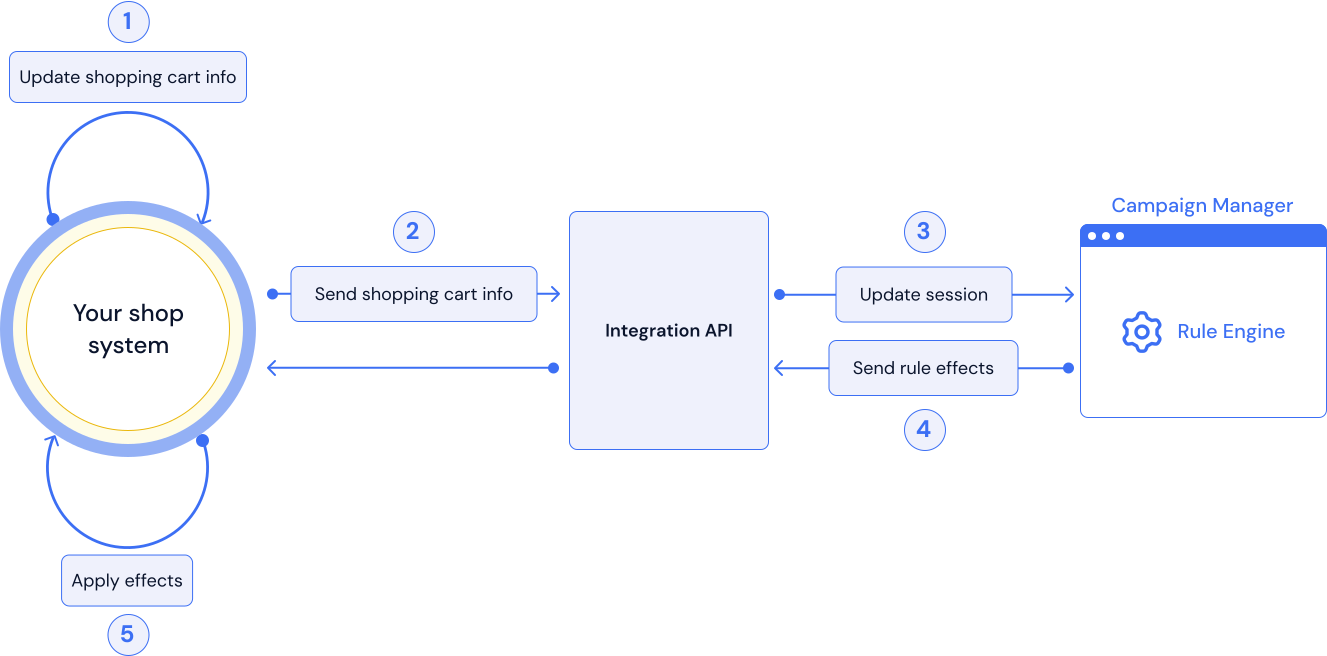
| Shop system | The ordering system or retail app integrated with Talon.One. |
| Customer session | A customer's shopping cart order. Contains details such as any coupon codes applied, the customer profile, and custom attributes such as shipping address or region. |
| Event | A single occurrence of a customer action, for example, joining your store's loyalty program. |
| Audiences | Specific customer groups that you can target in your campaigns. |